
Canva Pro
Many people need professional designs for social media, websites, marketing, or online work, but don’t have design skills or the time to learn complicated software. Canva Pro exists to make creating clean, professional visuals simple and fast for everyday users. It’s ideal for beginners, freelancers, content creators, bloggers, and small business owners who regularly create online content and want an easy way to design without stress. However, it may not be the right fit for advanced graphic designers who need deep creative control or large agencies working on complex, highly customized design projects. In simple terms, if you want fast, simple, professional-looking designs without technical headaches, this tool is made for you.
What Canva Pro Actually Is
Canva Pro is an easy online design tool that helps you create professional graphics without needing advanced design skills. It gives you ready-made templates, drag-and-drop editing, premium images and elements, and simple tools to create social media posts, thumbnails, presentations, website graphics, and marketing content — all in one place. Instead of using complicated design software, you can quickly design and download high-quality visuals in minutes, making it a practical tool for anyone creating content regularly.
How You Can Earn From Canva Pro
Canva Pro opens many simple and practical ways to start earning online, even if you’re a beginner. You can design social media posts, thumbnails, flyers, and marketing graphics for small businesses or content creators who need regular visuals but don’t want to design themselves. You can also create templates, ebooks, planners, or digital products and sell them online. Another great opportunity is designing graphics for print-on-demand platforms — like t-shirts, mugs, posters, or notebooks — which can become a more passive way to earn once your designs are live. You can use it to improve your own blogs, affiliate pages, or online services and attract more clients. It’s not a get-rich-quick tool, but it gives you real, practical opportunities to start small, build skills, and turn simple designs into income over time — following the smartest way to start a business.
Key Features of Canva Pro
Premium Templates Library – Thousands of ready-made professional designs for social media, ads, thumbnails, and business graphics.
Magic Resize – Instantly resize one design into multiple platform sizes (Instagram, YouTube, Facebook, etc.).
Background Remover – Remove image backgrounds with one click — perfect for product images and marketing graphics.
Brand Kit – Save your brand colors, fonts, and logos so all designs stay consistent.
AI Design Tools (Magic Write, AI Images, etc.) – Generate text, images, and layouts faster using AI features.
Premium Photos, Videos & Elements – Access a large library of stock content without needing other tools.
One-Click Social Media Scheduling – Design and schedule posts directly from Canva.
Transparent Background Downloads – Export logos and graphics cleanly for professional use.
Cloud Storage & Team Collaboration – Save designs online and work with clients or teammates easily.
Pricing & Plans
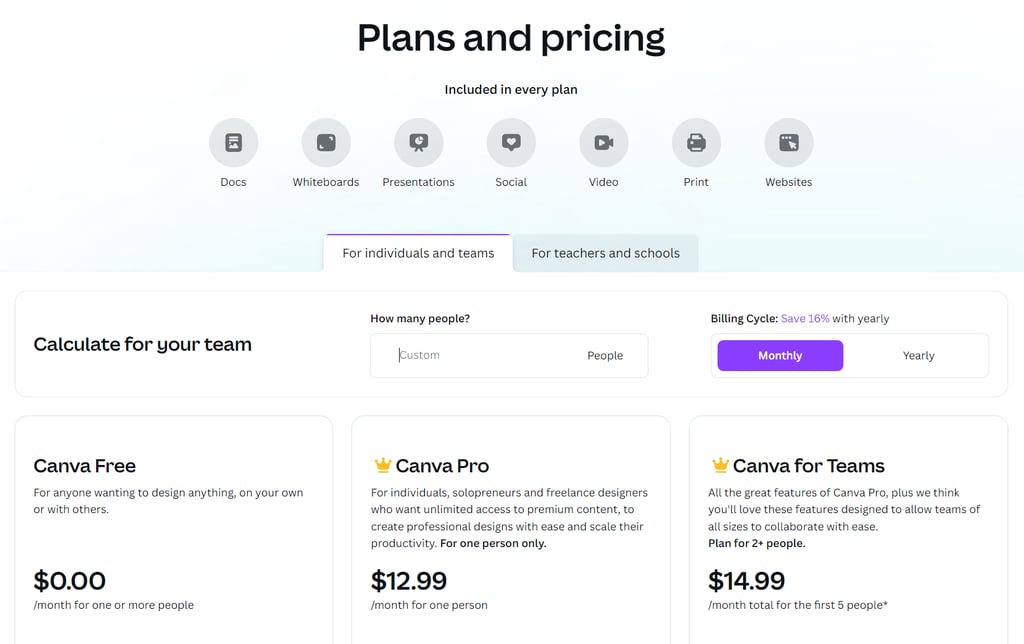
Canva offers a free plan, but most people upgrade to Canva Pro when they start using design seriously or want to earn from their work.
Free Plan – Good for beginners who just want to try Canva and create basic designs with limited templates and tools.
Canva Pro (Recommended) – Around $12.99/month or about $119.99/year (cheaper when paid yearly). This is the main plan most creators, freelancers, and online earners use because it unlocks premium templates, AI tools, stock content, brand kits, and powerful design features.
Canva Teams – Starts around $14.99/month per user and is designed for businesses or teams that need collaboration, shared brand assets, and team workflows.
Start directly with Canva Pro using the free trial so you can explore all premium features from day one without paying anything. If you don’t like it, just cancel before the trial ends; if you do, the yearly plan usually offers the best value compared to the monthly plan. Prices can vary by region and country, so always check Canva’s official pricing page for the most up-to-date local costs.
Pros & Cons
Pros
Easy to use – Drag-and-drop editor, beginner-friendly, no design skills needed
Huge template library – Thousands of ready-made designs for social media, marketing, and print
Premium stock content – Access to photos, videos, icons, and elements without extra cost
AI tools & features – Background remover, Magic Resize, and AI text/image generation speed up work
Brand consistency – Brand kits for colors, fonts, and logos make your designs look professional
Print-on-demand ready – Create designs for products like t-shirts, mugs, and planners
Collaboration & cloud storage – Save designs online and work with clients or teammates easily
30‑day free trial – Try Pro without risk before paying, which gives confidence to test the tool
Cons
Offline use is limited – Most features need an internet connection
Limited advanced customization – Not suitable for highly customized or advanced graphic designers.
How to Start Today
Sign up for Canva Pro (start the 30-day free trial)
Choose a template for social media posts, presentations, or products
Customize it — change text, colors, images, or add your logo
Download or publish your design online
Offer services or sell products — create graphics for small businesses, clients, or print-on-demand platforms
In just a few steps, you can go from zero to a live design that can earn money. It’s simple, fast, and anyone can start today.
Quick Comparison
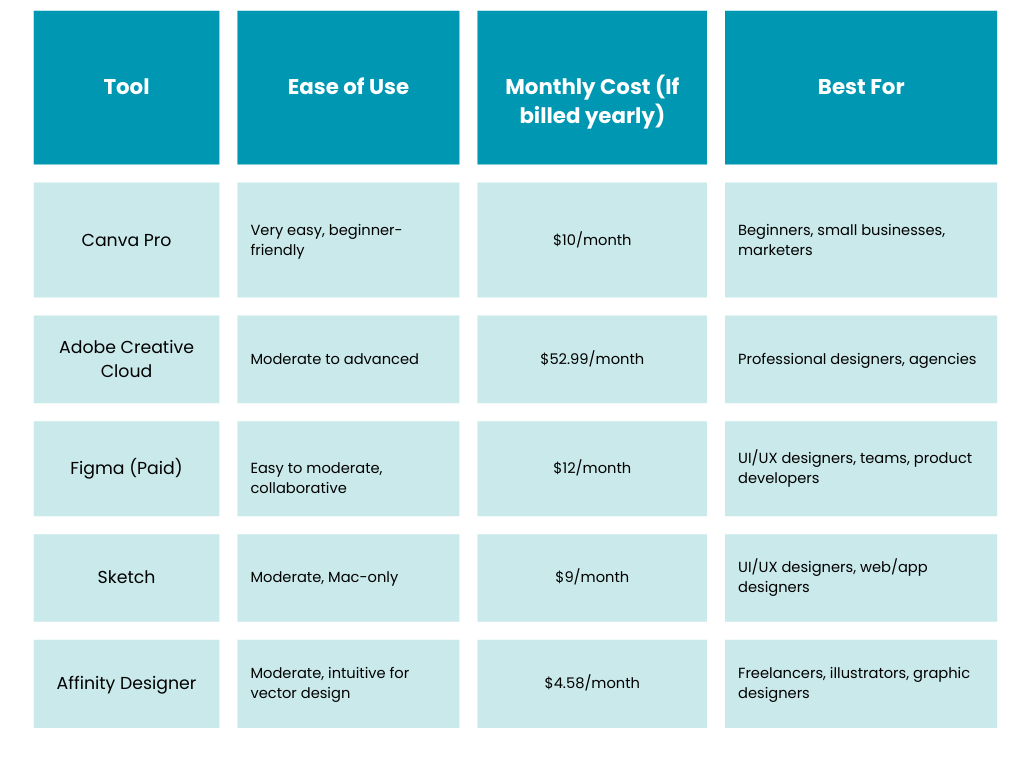
Note: Prices may vary by region and country. Always check the official pricing page of each tool for the most up-to-date local costs.
Honest Conclusion
Canva Pro is a tool that truly simplifies design and makes creating professional visuals achievable for anyone. With the 30-day free trial, it’s easy to explore and test without any risk. Over time, it becomes clear how much time it saves and how it opens opportunities to create content, build a brand, or even earn online — all without needing advanced design skills. Understanding why most people fail online can help you use tools like Canva Pro effectively and avoid common pitfalls.
It’s not a get-rich-quick solution, but with focus and dedication, it provides a practical, reliable way to turn ideas into high-quality designs. For beginners, freelancers, or small business owners looking to create consistently polished visuals, there are thousands of ideas and tutorials on YouTube and online, and most people learn to use it comfortably within a few days. Canva Pro is a smart investment that can empower creativity, build confidence, and support real progress.
© 2026. All rights reserved.
10 Profitable Items to Resell in 2026